


Common MacBook Problems & Professional Repair Solutions in Dubai
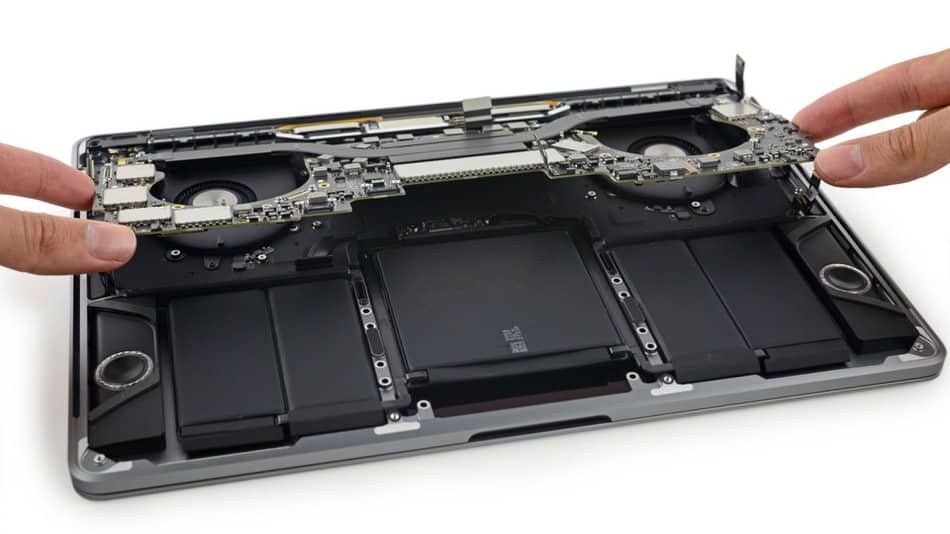
MacBooks are known for their sleek design, powerful performance, and reliable build quality. However, like all electronic devices, they can encounter problems over time. Whether you use your MacBook for work, creative projects, or daily tasks, understanding common issues and their solutions can help you know when to seek professional help.
In Dubai, many MacBook users face similar problems. Knowing what these issues are and how professional repair services address them can save you time, money, and frustration. In this guide, we will explore the most common MacBook problems and how experienced technicians solve them.
Screen and Display Problems
One of the most frequently reported MacBook issues is screen damage. MacBook displays are beautiful but delicate.
Cracked or Shattered Screens Dropping your MacBook or applying pressure to the display can crack the screen. Even small cracks can spread and worsen over time. A cracked screen not only looks bad but can also affect functionality and allow dust or moisture inside the device.
Professional repair involves carefully removing the damaged display and installing a new one. Technicians use specialized tools to avoid damaging the MacBook frame or internal components during this process. The replacement screen is tested thoroughly to ensure brightness, color accuracy, and responsiveness meet the highest standards.
Flickering Displays If your MacBook screen flickers, the problem might be with the display itself, the logic board, or the cable connecting them. Flickering can make working on your MacBook frustrating and can indicate a deeper issue that needs professional diagnosis.
Technicians use diagnostic tools to determine whether the problem is hardware-related or software-related. They can replace the screen, repair the connection cable, or address logic board issues as needed.
Black Screen or No Display When your MacBook powers on but the screen remains black, several issues could be at fault. The display might be completely failed, the backlight could be broken, or the logic board might have a problem.
Professional technicians test each component methodically. They might restart your MacBook in safe mode, check for software issues, or use specialized equipment to test the display and connections. If hardware replacement is needed, they handle it with precision.
Color Issues and Dead Pixels Some MacBook displays develop color problems or dead pixels where sections of the screen stop working. These issues worsen over time and eventually make the screen unusable.
Professional repair involves screen replacement. Modern MacBook displays are integrated units, so individual pixel repair is not possible. Complete screen replacement restores your display to perfect condition.
Battery and Power Problems
MacBook batteries are designed for long life, but they degrade gradually with use.
Battery Not Holding Charge If your MacBook battery drains unusually fast or no longer holds a charge for any meaningful time, the battery has degraded and needs replacement.
Technicians first check whether software is consuming excessive power. They run diagnostics to verify the battery itself is failing. If battery replacement is needed, they install a new battery and test it through complete charging cycles to ensure it works properly.
MacBook Won't Charge If your MacBook refuses to charge, the problem might be the battery, the charging cable, the power adapter, or the charging port.
Professional technicians test each component to identify the culprit. They check the charger output, inspect the charging port for damage, and verify the battery is recognized by the system. Based on their findings, they replace the defective component.
Service Battery Warning When MacOS shows a service battery warning, your battery has degraded to the point where Apple recommends replacement. Ignoring this warning can lead to unexpected shutdowns and potential data loss.
Professional service includes battery replacement with a genuine or high-quality certified battery that matches your specific MacBook model.
Sudden Power Loss If your MacBook suddenly shuts down without warning, the battery might be failing or the logic board might have a power management issue.
Technicians diagnose whether the problem is battery-related or requires motherboard evaluation. They address the root cause to prevent future sudden shutdowns.
Keyboard and Trackpad Issues
MacBook keyboards are known for being responsive, but they can develop problems.
Unresponsive or Sticky Keys MacBook keyboards can become unresponsive or sticky due to dust, debris, or liquid spillage. This makes typing frustrating and impacts your productivity.
Professional repair might involve cleaning the keyboard, replacing individual keys, or replacing the entire keyboard module depending on the severity. Each key is tested after repair to ensure smooth operation.
Keys That Don't Register Sometimes MacBook keys stop registering presses entirely. This usually indicates a mechanical problem within the keyboard that requires professional attention.
Technicians might repair the keyboard mechanism or replace the keyboard entirely. Either way, your typing will be restored to normal function.
Trackpad Responsiveness Issues Your MacBook trackpad might become unresponsive, jumpy, or fail to recognize gestures.
Professional diagnosis determines whether the problem is mechanical or related to the logic board. Trackpad replacement restores full responsiveness and gesture recognition.
Clicking Issues If your trackpad makes unusual sounds, doesn't click properly, or the click mechanism feels broken, professional repair can fix it.
Technicians replace the trackpad assembly, ensuring all mechanical and electrical components function properly.
Motherboard and Logic Board Problems
These are the most serious MacBook issues and require experienced technicians.
MacBook Won't Power On If your MacBook won't turn on at all or powers on but immediately shuts down, you likely have a logic board problem.
Technicians use specialized diagnostic equipment to test the motherboard. They check power delivery, component functionality, and identify faulty parts. Sometimes the issue can be fixed by cleaning corrosion or replacing a failed component. Other times, full motherboard replacement is necessary.
Kernel Panics and Constant Crashes If your MacBook constantly crashes or shows kernel panic errors, the logic board might be failing.
Professional technicians run comprehensive diagnostics. They check for software issues first, then evaluate hardware if needed. Logic board problems require careful diagnosis and often professional repair or replacement.
Excessive Heat If your MacBook runs extremely hot, the motherboard might have a failing component or the cooling system might be blocked.
Technicians clean dust from cooling vents and fans. They test the logic board for heat-generating component failures. Proper heat management restores your MacBook to normal operating temperatures.
Random Restarts If your MacBook randomly restarts during use, power management issues or motherboard problems are likely causes.
Professional diagnosis identifies whether software or hardware is responsible. Logic board repair or replacement fixes hardware-related restart issues.
Water and Liquid Damage
Accidental spills are more common than you might think.
Coffee, Water, or Juice Spills Liquid entering your MacBook can cause immediate or delayed damage. Coffee contains acids and sugars that accelerate corrosion.
If you spill liquid on your MacBook, power it off immediately and get professional help. Professional technicians disassemble your MacBook carefully, clean all components, remove corrosion, and replace any damaged parts. The faster you seek help, the better your chances of full recovery.
Salt Water Exposure If your MacBook was exposed to salt water, professional cleaning is essential. Salt accelerates corrosion significantly.
Technicians use specialized cleaning solutions and techniques to remove salt residue and prevent ongoing corrosion.
Charging Port Problems
Your MacBook charging port enables power delivery and sometimes data transfer.
Loose or Damaged Charging Port If your MacBook only charges when the cable is positioned at certain angles or doesn't charge at all, the port might be damaged.
Professional repair involves either repairing the port connections or replacing the entire port. Either way, reliable charging is restored.
Port Corrosion Dust, debris, or moisture in the charging port can cause corrosion and connection problems.
Technicians clean the port carefully and test charging to ensure full functionality.
Software Issues Mistaken for Hardware Problems
Sometimes MacBook problems that seem hardware-related are actually software issues.
Freezing and Slowness If your MacBook is sluggish or freezes frequently, the problem might be too many background applications, insufficient storage, or malware rather than hardware failure.
Professional technicians can diagnose software issues, optimize performance, remove malware, and suggest improvements.
Fan Running Constantly Continuous fan noise sometimes indicates excessive system load rather than hardware problems. Professional evaluation determines the cause.
When to Seek Professional Help
You should visit a professional MacBook repair service if you experience any of these issues:
Your screen is cracked, black, or flickering persistently. Your MacBook won't power on or constantly restarts. Your battery no longer holds charge or shows service battery warnings. Your keyboard or trackpad is unresponsive. Your MacBook runs extremely hot. Your charging port doesn't work. Liquid has entered your device. Your MacBook performs slowly despite adequate storage and memory.
Professional diagnosis identifies the root cause and provides appropriate solutions. Early intervention prevents small problems from becoming expensive repairs.
Advantages of Professional Repair Over DIY
Attempting MacBook repairs yourself risks permanent damage. Professional repair shops have proper tools, genuine parts, trained technicians, and warranties that DIY attempts cannot match.
Professional repair is faster, safer, and more reliable than troubleshooting on your own.
Finding Professional MacBook Repair in Dubai
Dubai has several professional MacBook repair services ready to help. When choosing a repair shop, look for experience with your MacBook model, transparent communication, warranty coverage, and positive customer reviews.
Final Thoughts
MacBook problems are inevitable as your device ages. Recognizing common issues and seeking professional help promptly prevents small problems from becoming expensive repairs. Professional technicians in Dubai can diagnose and fix virtually any MacBook problem, from simple battery replacement to complex motherboard repair.
When your MacBook experiences issues, don't struggle with DIY fixes. Contact a professional MacBook repair service and have your device restored to full working condition. Your productivity and peace of mind are worth the investment in quality professional repair.

 English
 Arabic
 French
 Spanish
 Portuguese
 Deutsch
 Turkish
 Dutch
Dutch
 Italiano
 Russian
 Romaian
 Greek
Greek