


Alliance Whitelist Update – Streamline Membership Control
Alliance Whitelist Update
On March 3, 2025, the game received an exciting update introducing the alliance whitelist feature. This addition addresses a popular community request by enabling leaders to manage alliance membership more efficiently.
With the whitelist, alliance leaders can now designate specific players to join or rejoin their alliance without opening it up to all players through open recruitment. This streamlined process helps maintain better control over alliance membership flow and reduces the time spent managing invites.
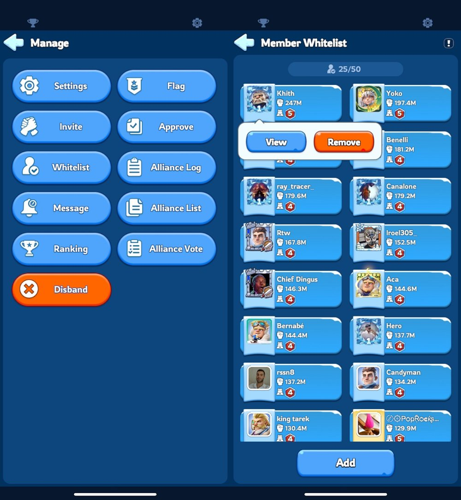
Only players holding the R5 rank, the alliance leader, have the authority to set up the whitelist. To do so, navigate to the alliance menu and select the settings option. From there, click on the whitelist section, where you can pick the players you wish to add. After selection, confirm your choices to finalize the whitelist setup, ensuring smooth management of your alliance members.
Immediately following this, you will have access to the most recent version of your member roster.
In Whiteout Survival, only the alliance leader at R5 level has the authority to manage the whitelist. To remove a player, access the alliance menu and navigate to the settings section. From there, select the whitelist option to view the list of approved members. Find the player you wish to remove, click on their name, and then confirm by selecting the remove option.
In Whiteout Survival, only players holding the rank of R5 have the authority to add or remove members from the alliance whitelist. The system currently allows a maximum of 50 players to be listed at any given time, which can limit flexibility for alliance management.
When a player who is on the whitelist re-enters the alliance, they are automatically assigned the top rank, R1. This means that R5 members need to manually promote them to their appropriate rank afterward. Such a process can be cumbersome, especially for R4 members who frequently switch alliances. Allowing players to retain their previous rank upon rejoining would greatly streamline operations and reduce the workload for R5 officers. Fans of the game hope that future updates will address this issue to improve alliance management.
Regarding the whitelist's scope, game support clarified that it is specific to each alliance. A player can be added to multiple alliance whitelists simultaneously without restrictions. This flexibility enables players to participate in multiple alliances and move freely between them. There is no limit to the number of alliances that can whitelist a player, making it easier to manage alliances and collaborations.
Finally, when an R5 officer adds a player to the whitelist, the player will receive a notification email confirming their status update.
Alliance Flexibility and Marking
Players have the flexibility to exit their current alliance and rejoin whenever they choose. Alliances that are approved through the whitelist will be distinctly marked within the alliance directory for easy identification.
Whiteout Survival Frost Star: Usage and Acquisition
Whiteout Survival Frost Star is the exclusive premium currency used in Whiteout Survival to unlock valuable in-game items, speed up progression, and obtain rare resources that boost your survival and strategic capabilities. Players looking to enhance their gameplay can easily acquire Frost Star by topping up through popular game trading platforms such as Codashop, SEAGM, and OffGamers. With Frost Star, you can gain access to advanced heroes, special upgrades, and essential materials, giving you a competitive edge in the challenging icy world. Secure your Whiteout Survival Frost Star conveniently to elevate your adventure and strengthen your city.
Whiteout Survival Top Up on LootBar
If players are looking to top up Whiteout Survival Frost Star, they may want to consider the lootbar game trading platform for a smooth and efficient experience. Lootbar.gg stands out as a trusted choice for Whiteout Survival top up, offering premium in-game currency like frost stars whiteout survival at competitive rates. Not only does lootbar provide a secure and professional environment for purchases, but it also supports a wide array of payment options, making transactions both flexible and convenient for players worldwide.
Moreover, lootbar.gg delivers exceptional value by regularly offering discounts on in-game currency, with Whiteout Survival top up discounts reaching up to 5% off. In addition to these savings, players benefit from 24/7 customer support, ensuring any questions or concerns are addressed promptly. By choosing lootbar for their frost stars whiteout survival needs, gamers can enjoy both peace of mind and high-quality service, making it an ideal platform for enhancing their gameplay.
How to Top Up Whiteout Survival on LootBar
To top up Whiteout Survival Frost Star on the lootbar trading platform, start by navigating to the official LootBar website and logging into your account. Make sure to select your preferred language and currency type for a smooth transaction experience. Locate the top-up section and choose the game Whiteout Survival from the available options. Next, decide on the quantity of Frost Star you wish to purchase and enter your unique Whiteout Survival UID to ensure the premium currency is credited to the correct account.
Once you've filled in the necessary details, proceed by clicking the "Top-up now" button. You will then be prompted to select your preferred payment method; choose one that is convenient for you and confirm the transaction by clicking "Pay Now." After completing the payment, the Frost Star will be delivered directly to your game account, allowing you to enjoy enhanced gameplay with your newly acquired currency. This streamlined process makes it simple and secure to top up Whiteout Survival Frost Star through LootBar.
What is the best Gaming Top-Up Platform?
As a trusted choice for gaming top-up, LootBar offers both top speed and affordability. The platform has earned a reputation as the best platform for gaming recharge, supported by outstanding customer feedback—4.9/5.0 on Trustpilot.

 English
 Arabic
 French
 Spanish
 Portuguese
 Deutsch
 Turkish
 Dutch
Dutch
 Italiano
 Russian
 Romaian
 Greek
Greek